The newest Krira TV is version 6.4.3. If the app is asking you to update, this is the version it wants.

- Version
- 6.4.3
- Size
- 11.3 MB
- Requires
- Android 7.0+
- Price
- Free
What's new in 6.4.3
Streams start more reliably. Security and stability improvements. Crash fixes.
Updates to Krira TV are mostly about keeping streams working: sports sites and stream sources change all the time, and each release adjusts the app to keep up. That is why staying on the latest version matters more for Krira TV than for most apps.
How to update Krira TV
Updating is the same as installing — the new APK installs over the old one.
- Download the latest APK from the download page.
- Open the file. Android shows "Do you want to update this app?" instead of a fresh install.
- Tap Update. Your settings and favourites stay as they were.
- Open Krira TV. You can check the version in the app's menu or in Settings → Apps → Krira TV.
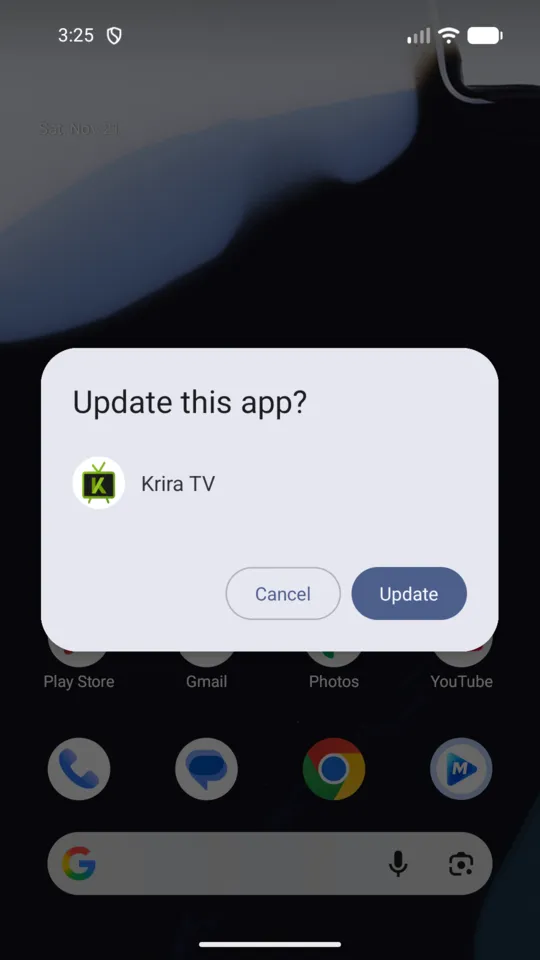
Don't uninstall first. It isn't needed and you would lose your settings. Only uninstall if the update fails with "App not installed" — see install errors.
Why old versions stop working
People sometimes look for an older Krira TV because "it worked better". Unfortunately old versions are retired on purpose:
- Streams move. Old versions point to sources that no longer exist, so they show empty lists or endless loading.
- Security fixes. Newer releases close problems found in older ones.
- Forced update. When a version is too old to work, the app shows an update screen instead of failing silently.
If the newest version gives you trouble, it is almost always fixable without going back — try the steps in Krira TV not working.
Keeping track of updates
You don't need to check this page every day. When an update matters, Krira TV tells you inside the app. If you want to double-check, the version number at the top of this page is always the current one — it's read from the same release information the official download uses.